I’ve been working on this script for a while, and now with the second version I think I’m pretty close to perfection. 😛 I’ve always wanted to find a software which could let me have a nice integration between different kind of applications on Ubuntu. My favorite distribution is based on GNOME, which uses GTK+ libraries to render GUI components.
It was already possible for KDE users to render GTK+ controls as native Qt ones. But not vice-versa. You could obviously already find and configure similar styles for Qt and KDE imitating your Clearlooks, Human, or whatever theme. This is a very boring process. You have to install various configuration tools (two for qt and two for KDE) and then set every single color by hand, and also the fonts of course.
My first version of this script (italian article here) was able to configure automatically every settings file (Qt 3, Qt 4, KDE 3, KDE 4) perfectly under Ubuntu 8.10. Now thanks to QGtkStyle too, it’s possible to get an even more integrated environment. You can get a native rendering of qt4 and KDE 4 controls as they were GTK+. That’s great. There is still the problem that you need to adjust Qt 3 and KDE 3 look.
UniformUI version 2 does the trick. 😀 First of all it scans your GNOME settings searching for the colors you’re using, the fonts, and the cursor theme. Then it starts building configuration files. The first is the qt3 one. If you don’t have QtCurve for KDE 3 installed on your system, the script will download it for you and manually unpack it from an Ubuntu package (it should work on every distribution by the way). After that, the KDE 3 configuration file is created.
Finally, it assures that Qt 4 and KDE 4 apps use the native GTK+ style. The only action you have to perform is starting the script in a terminal and typing your password when prompted. This is the default system mode. If you want to run in user mode, then you just have to start the script with the -u switch. In this mode every part of the configuration (even those useful and suitable for everyone) is written in you user directory. The only action performed as root is the installation of QtCurve.
Here’s a brief overview of two apps (one using GTK+ and one using Qt 3) after setting a theme in GNOME and executing UniformUI:
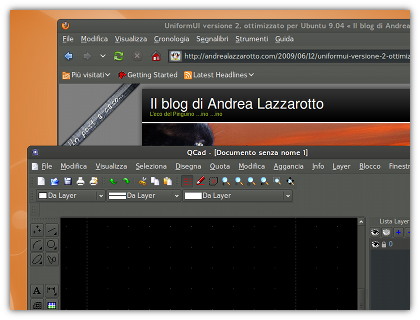
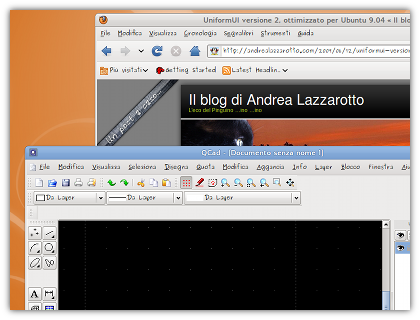
Download it here.
Warning: at this moment the script runs only and exclusively on Ubuntu 9.04 Jaunty Jackalope. Do not try to run it on other versions of Ubuntu.
The script should work with almost every GNOME theme, cursor theme, and font selection. I’ve tested it on Ubuntu 9.04 but it should work in every distribution (just be sure you’ve installed QGtkStyle). If you are encountering problems related to finding the colors, check if your theme supports them, and then try to change a little one of the colors and then bring it back to what it was (manually, don’t use the restore to defaults function). Finally run the script again, it should be fine.
Remember you need to run this script every time you change theme in GNOME. But it’s not such a difficult task.
If you have any suggestions, questions, messages, or anything else… just leave a comment here. I would be delighted if you could tell me whether it is good and suitable to your tastes or not after you’ve given it a try. Thanks.
Update: thanks to Nickholas for correcting my English grammar.

Hello Andrea,
Can I write about this and make a complete howto? Of course, with a link to your post.
Sure you can.
Nice stuff. This I will definitely try out. Thanks for the heads up!
Hi. How to undo changes which your script did? My cursor is now ugly black 🙁
Which cursor, do you mean gnome? It’s impossible. My script reads only the Gnome cursor. You can anyway change it with the Gnome control center…
Problem is I can’t change. If I try nothing happens.
rm ~/.icons/default/index.theme
Then logout and log back in.
By the way, what distro and cursor theme are you using?
thanks, it’s good again.
I use Ubuntu 9.04, theme: Shiki-wine, cursor: default
Oh… This is the problem (but it shouldn’t be!). Sounds like a regression from a previous version, I need to fix this. By the way now you should manually set the theme to DMZ (white), even if “default” is the same thing…
Wath is the password of the archive in mediafire?
O.O Sorry, it was an error with the file hosting… Now you don’t need any passwords.
Thank you very much!!! 🙂
Great!!!
This script messed up my cursor (and the above fix did not work), grayed and pixellated most of my kde fonts, and i get like five alerts every time I try to start any of them saying ‘Will not save configuration …./kdeglobals not writable. When I change the permissions it’s ok there but when i run the script again it changes the permissions again.
It did not change the kde fonts to the font I’m using. It made digikam look awful. I really want to go back to the way it was, like this never happened. How do I undo this??
The script is 3 months old and of course needs revision. Btw, seems like you used your script with Kde being present. This is a Gnome only script. Anyway, don’t worry. you just need to delete the files created by the script. You can read them inside.
If I remember correctly, they are:
/etc/kde3/kdeglobals
/etc/kde4/kdeglobals
/etc/qt3/qtrc
$HOME/.kde/share/kdeglobals (or something like that)
And finllay you’ve got your cursor file which is in your home (just see the script). I’m not on my PC now so I can’t check by myself, sorry.
Ciao, dopo aver lanciato il tuo script i font in Firefox sono diventati bruttissimi, che posso fare per riparare?
Naturalmente presumo che tu abbia usato l’ultima versione dello script (la 2) solo sulle versioni di Ubuntu ufficialmente supportate (9.04 per la versione 2). Che intendi per bruttissimi? Mi puoi linkare uno screenshot?
Hey there.
Can I use this script in Ubuntu 10.04? I know you say in the post it only works under Ubuntu 9.04, but I’d like to confirm it anyway…
Anyway, are you planning to make a 10.04 version?
Thanks, and have fun.
If you’re brave enough, then you can go on but…
1. read it all the way and remember what it does
2. comment the part when it changes the cursor, just in case
I guarantee nothing.